Random numbers in query

Some times you may want to select rows from some table and in each row you would like to have some random number generated. You may want to try the RAND() function. However, it will generate a random number, all the returned rows will have the same random number and this is mostly not what you intended.

SELECT TOP 10
    RAND()
FROM sys.all_columns

Running the above query you will receive.

----------------------
0,173895240378828
0,173895240378828
0,173895240378828
0,173895240378828
0,173895240378828
0,173895240378828
0,173895240378828
0,173895240378828
0,173895240378828
0,173895240378828

(10 row(s) affected)

This is caused because the RAND() function is a constant function and the constant function is executed once on the query start, and then the value is used everywhere in the query. There are more functions in SQL Server, that behave as Constant Expressions and which are executed once per the whole Query e.g. the GETDATE() function.

Whether the function is a executed as constant expression or whether it is executed once per row, you can find from the XML plan for the query. If we take the a look on the XML plan for the above query we will see:

<?xml version="1.0" encoding="utf-16"?>
<ShowPlanXML xmlns:xsi="http://www.w3.org/2001/XMLSchema-instance" xmlns:xsd="http://www.w3.org/2001/XMLSchema" Version="1.1" Build="10.50.1600.1" xmlns="http://schemas.microsoft.com/sqlserver/2004/07/showplan">
  <BatchSequence>
    <Batch>
      <Statements>
        <StmtSimple StatementCompId="1" StatementEstRows="10" StatementId="1" StatementOptmLevel="FULL" StatementOptmEarlyAbortReason="GoodEnoughPlanFound" StatementSubTreeCost="0.00346253" StatementText="SELECT TOP 10
    RAND()
FROM sys.all_columns" StatementType="SELECT" QueryHash="0x479AE6BF06344217" QueryPlanHash="0x1960EA8D4F47E514">
          <StatementSetOptions ANSI_NULLS="true" ANSI_PADDING="true" ANSI_WARNINGS="true" ARITHABORT="true" CONCAT_NULL_YIELDS_NULL="true" NUMERIC_ROUNDABORT="false" QUOTED_IDENTIFIER="true" />
          <QueryPlan CachedPlanSize="32" CompileTime="3" CompileCPU="3" CompileMemory="544">
            <RelOp AvgRowSize="15" EstimateCPU="1E-06" EstimateIO="0" EstimateRebinds="0" EstimateRewinds="0" EstimateRows="10" LogicalOp="Compute Scalar" NodeId="0" Parallel="false" PhysicalOp="Compute Scalar" EstimatedTotalSubtreeCost="0.00346253">
              <OutputList>
                <ColumnReference Column="Expr1063" />
              </OutputList>
              <ComputeScalar>
                <DefinedValues>
                  <DefinedValue>
                    <ColumnReference Column="Expr1063" />
                    <ScalarOperator ScalarString="rand()">
                      <Identifier>
                        <ColumnReference Column="ConstExpr1065">
                          <ScalarOperator>
                            <Intrinsic FunctionName="rand">
                              <ScalarOperator>
                                <Const ConstValue="" />
                              </ScalarOperator>
                            </Intrinsic>
                          </ScalarOperator>
                        </ColumnReference>
                      </Identifier>
                    </ScalarOperator>
                  </DefinedValue>
                </DefinedValues>
                <RelOp AvgRowSize="9" EstimateCPU="1E-06" EstimateIO="0" EstimateRebinds="0" EstimateRewinds="0" EstimateRows="10" LogicalOp="Top" NodeId="1" Parallel="false" PhysicalOp="Top" EstimatedTotalSubtreeCost="0.00346153">
                  <OutputList />
                  <Top RowCount="false" IsPercent="false" WithTies="false">
                    <TopExpression>
                      <ScalarOperator ScalarString="(10)">
                        <Const ConstValue="(10)" />
                      </ScalarOperator>
                    </TopExpression>
                    <RelOp AvgRowSize="9" EstimateCPU="0.000515516" EstimateIO="0" EstimateRebinds="0" EstimateRewinds="0" EstimateRows="10" LogicalOp="Concatenation" NodeId="2" Parallel="false" PhysicalOp="Concatenation" EstimatedTotalSubtreeCost="0.00346053">
                      <OutputList />
                      <Concat>
                        <DefinedValues />
                        <RelOp AvgRowSize="9" EstimateCPU="0.00083584" EstimateIO="0" EstimateRebinds="0" EstimateRewinds="0" EstimateRows="10" LogicalOp="Filter" NodeId="3" Parallel="false" PhysicalOp="Filter" EstimatedTotalSubtreeCost="0.00337579">
                          <OutputList />
                          <Filter StartupExpression="false">
                            <RelOp AvgRowSize="13" EstimateCPU="0.0008753" EstimateIO="0.0068287" EstimateRebinds="0" EstimateRewinds="0" EstimateRows="10" LogicalOp="Index Scan" NodeId="4" Parallel="false" PhysicalOp="Index Scan" EstimatedTotalSubtreeCost="0.00335999" TableCardinality="653">
                              <OutputList>
                                <ColumnReference Database="[TestDB]" Schema="[sys]" Table="[syscolpars]" Column="id" />
                              </OutputList>
                              <IndexScan Ordered="false" ForcedIndex="false" ForceSeek="false" NoExpandHint="false">
                                <DefinedValues>
                                  <DefinedValue>
                                    <ColumnReference Database="[TestDB]" Schema="[sys]" Table="[syscolpars]" Column="id" />
                                  </DefinedValue>
                                </DefinedValues>
                                <Object Database="[TestDB]" Schema="[sys]" Table="[syscolpars]" Index="[nc]" IndexKind="NonClustered" />
                                <Predicate>
                                  <ScalarOperator ScalarString="[TestDB].[sys].[syscolpars].[number]=(0)">
                                    <Compare CompareOp="EQ">
                                      <ScalarOperator>
                                        <Identifier>
                                          <ColumnReference Database="[TestDB]" Schema="[sys]" Table="[syscolpars]" Column="number" />
                                        </Identifier>
                                      </ScalarOperator>
                                      <ScalarOperator>
                                        <Const ConstValue="(0)" />
                                      </ScalarOperator>
                                    </Compare>
                                  </ScalarOperator>
                                </Predicate>
                              </IndexScan>
                            </RelOp>
                            <Predicate>
                              <ScalarOperator ScalarString="has_access('CO',[TestDB].[sys].[syscolpars].[id])=(1)">
                                <Compare CompareOp="EQ">
                                  <ScalarOperator>
                                    <Intrinsic FunctionName="has_access">
                                      <ScalarOperator>
                                        <Const ConstValue="'CO'" />
                                      </ScalarOperator>
                                      <ScalarOperator>
                                        <Identifier>
                                          <ColumnReference Database="[TestDB]" Schema="[sys]" Table="[syscolpars]" Column="id" />
                                        </Identifier>
                                      </ScalarOperator>
                                      <ScalarOperator>
                                        <Const ConstValue="" />
                                      </ScalarOperator>
                                      <ScalarOperator>
                                        <Const ConstValue="" />
                                      </ScalarOperator>
                                    </Intrinsic>
                                  </ScalarOperator>
                                  <ScalarOperator>
                                    <Const ConstValue="(1)" />
                                  </ScalarOperator>
                                </Compare>
                              </ScalarOperator>
                            </Predicate>
                          </Filter>
                        </RelOp>
                        <RelOp AvgRowSize="9" EstimateCPU="0.0132712" EstimateIO="0.0749769" EstimateRebinds="0" EstimateRewinds="0" EstimateRows="1" LogicalOp="Index Scan" NodeId="6" Parallel="false" PhysicalOp="Index Scan" EstimatedTotalSubtreeCost="0.00329434" TableCardinality="11922">
                          <OutputList />
                          <IndexScan Ordered="false" ForcedIndex="false" ForceSeek="false" NoExpandHint="false">
                            <DefinedValues />
                            <Object Database="[mssqlsystemresource]" Schema="[sys]" Table="[syscolrdb]" Index="[ncl]" IndexKind="NonClustered" />
                            <Predicate>
                              <ScalarOperator ScalarString="[mssqlsystemresource].[sys].[syscolrdb].[number]=(0)">
                                <Compare CompareOp="EQ">
                                  <ScalarOperator>
                                    <Identifier>
                                      <ColumnReference Database="[mssqlsystemresource]" Schema="[sys]" Table="[syscolrdb]" Column="number" />
                                    </Identifier>
                                  </ScalarOperator>
                                  <ScalarOperator>
                                    <Const ConstValue="(0)" />
                                  </ScalarOperator>
                                </Compare>
                              </ScalarOperator>
                            </Predicate>
                          </IndexScan>
                        </RelOp>
                      </Concat>
                    </RelOp>
                  </Top>
                </RelOp>
              </ComputeScalar>
            </RelOp>
          </QueryPlan>
        </StmtSimple>
      </Statements>
    </Batch>
  </BatchSequence>
</ShowPlanXML>

On the line 19 or the Query you can see ConstExpr1065 under the node of <ScalarOperator ScalarString="rand()">. Each function which is in the XML plan expressed in the ColumnReference as ConstExpr is executed as constant function once per whole query.

Workaround for RAND function

As a workaround for generating the random numbers in a query, it is possible to use the NEWID() function. Although it the return value of the function is uniqueidentifier, every call to the function return a new unique value, which we can use a CHECKSUM() function over it which calculates checksum of an expression the checksum is an integer value. Because the value can be negative or positive it is necessary to use ABS() over it to receive consistent values.

So finally we can write following query:

SELECT TOP 10
    ABS(CHECKSUM(NEWID())) AS Random,
    ABS(CHECKSUM(NEWID())) % 100 AS Random_0_100,
    CAST(CHECKSUM(NEWID()) & 0x7fffffff AS float) / CAST(0x7fffffff as int)  AS RandomFloatValue
FROM sys.all_objects

And the result will be similar to the one below where each value is unique random number.

Random      Random_0_100 RandomFloatValue
----------- ------------ ----------------------
1060745673  73           0,290147927724825
1053300815  99           0,835112006792385
1233927720  13           0,551734537608798
1059863691  70           0,316186188401741
495435569   98           0,770220997636309
1364620416  82           0,404617617095177
783618590   58           0,161057420615599
1176654027  15           0,522251577825403
1871862272  0            0,295878297321442
1870125345  10           0,0176546154625968

(10 row(s) affected)

SQL Script Manager by RedGate

On December 16. 2010 RedGate released a free tool for DBAs for managing and and running T-SQL or IronPython scripts. You can download the script manager directly from RedGate SQL Script Manager site.

SQL Script Manager

The script manager allows you to manage collects scripts, and simplify their execution using Presets. Scripts are organized by Tags and Authors.

Script manager comes pre-bundled with 25 administration scripts and other scripts can be downloaded from SqlCentral.com scripts repository.

User can even create it’s own scripts. The scripts are encapsulated inside the .rgtool file, which is an XML file which structure is described on the RedGate support pages for the SQL Script Manager.

However it is interesting tool for collecting and managing scripts, I think, it brings nothing special what cannot be handled by the Templates and Templates Manager integrated in Management Studio (if talking about T-SQL Scripts). What more, SQL Management Studio Denali brings a new Code Snippets known from C# and VB .NET development in Visual Studio, which brings another power to the SSMS and from my point of view, writing the .rgtool is more complicated than writing a T-SQL template. On the other site it could be a useful tool for beginners DBAs.

Using Stored Procedure as Data Source in Excel

When you want to use a SQL Server as external data source in excel, you can find, that it is not possible to select a stored procedure as a source of data in the Data Connection Wizard. This can lead to a conclusion, that it’s not possible to use a Stored Procedure as a source of data in Excel.

Excel Data Connection Wizard

Although, you cannot select a stored procedure, in the Data Connection Wizard, there is a simple workaround who to select a stored procedure as a source of data in Excel.

First, create a connection using the wizard and select any table as a source for the newly created connection. Once the connection is created, choose properties for the connection and switch to the Definition Tab.

Workbook Connections & Connection Properties

In the Definition type, change the Command Type to SQL and as Command text put the EXEC statement to execute the stored procedure. Once you enter, the Exec command, and confirm the dialog, you have fully configured  connection to SQL Server which source is a Stored Procedure.

Excel Connection Properties

On the dialog confirmation a warning message appears telling you, that the connection in Excel and the external connection files doesn’t match and that the link will be removed. Simply confirm the message by Yes as the connection will be stored in the excel workbook.

Confirmation of removing link to a connection file

Such modified connection you can use for importing data to Excel sheet, pivot table, pivot graph etc..

First report and report after specific time interval starts a long time on MS SQL 2008 Reporting Services

Today an interesting article was published on MS SQL Tips: How to Speed up MS SQL Reporting Services on First Run.

It’s about solving a problem with slow loading of first report (or even accessing the report manager) in MS SQL 2005 Reporting Services. On SSRS 2005 the problem by default occurs every 20 minutes of idle time.

The same problem occurs also on MS SQL 2008 and MS SQL 2008R2 Reporting Services, but in 12 hours intervals. As Reporting Services 2008+ doesn’t use the IIS server and use it’s own integrated web service, solving the problem is quite different.

On SQL Server Reporting Services 2008 the problem occurs when an Application Domain is recycled and by default it’s 12 hours (720 minutes). After this time a new application domain is created an all new requests are redirected to the new application domain. Once the application domain is recycled, the new domain has to authenticate to the database server, load all necessary structures and this prolongs the first report startup after the domain is recycled.

If this default behavior (recycling every 12 hours) doesn’t meet your business needs as, you can modify the Report Server configuration file and specify a value which will be closer to your needs.

The configuration is stored in the rsreportserver.config file which is located in the installation directory of the Report Server instance. E.g. for default instance of SQL Server 2008 R2 Reporting Services it is located in ”C:Program FilesMicrosoft SQL ServerMSRS10_50.MSSQLSERVERReporting ServicesReportServer” directory.

The part which interests us is in the Service Node and it’s RecycleTime parameter:

  <Service>
    <IsSchedulingService>True</IsSchedulingService>
    <IsNotificationService>True</IsNotificationService>
    <IsEventService>True</IsEventService>
    <PollingInterval>10</PollingInterval>
    <WindowsServiceUseFileShareStorage>False</WindowsServiceUseFileShareStorage>
    <MemorySafetyMargin>80</MemorySafetyMargin>
    <MemoryThreshold>90</MemoryThreshold>
    <RecycleTime>720</RecycleTime>
    <MaxAppDomainUnloadTime>30</MaxAppDomainUnloadTime>
    <MaxQueueThreads>0</MaxQueueThreads>
    <UrlRoot>
    </UrlRoot>
    <UnattendedExecutionAccount>
      <UserName>
      </UserName>
      <Password>
      </Password>
      <Domain>
      </Domain>
    </UnattendedExecutionAccount>
    <PolicyLevel>rssrvpolicy.config</PolicyLevel>
    <IsWebServiceEnabled>True</IsWebServiceEnabled>
    <IsReportManagerEnabled>True</IsReportManagerEnabled>
    <FileShareStorageLocation>
      <Path>
      </Path>
    </FileShareStorageLocation>
  </Service>

By modifying the RecycleTime, you can shorten or prolong the recycling interval. The interval is specified in minutes and as mentioned above the default value is 720 minutes (12 hours).

Detail on the Application Domains for Report Server Applications can be found on MSDN. Details about the RSReportServer configuration file is also available on MSDN.

As mentioned in the documentations the MaxAppDomainUnloadTime is a time interval in minutes for which the Reporting Services are waiting for any current operation to finish during recycling the Application Domain. As It was mentioned during recycling Application Domain a new Domain is created and all new requests are directed to the new Application Domain and the current one is leave for the MaxAppDomainUnloadTime if there are currently some jobs running. If the jobs are not finished during the MaxAppDomainUnloadTime, the Application Domain is restarted and all jobs terminated.

If you have some some reports, especially scheduled one, which could take longer than the default 30 minutes to process, you can also consider to alter this parameter according to your needs. On the other side, if there is some job running for such a long time, it should be analyzed why it takes so long and whether it could be optimized in some way.

There is a lot of other interesting parameters in this configuration file, which could useful especially in the Scale-out SSRS Deployment scenarios. I will focus on some of them in one of the future posts.

For the overall workaround of this problem using PowerShell, see my later post Solving issue with first long starting report on SSRS 2008.

SSIS with Excel Source/Destination on x64 SQL Server Instance

Not all people know, that the Excel file format is not supported by the x64 version of SQL server and the same apply to the SSIS runtime. This apply not only to excel but to all data sources for which you have only 32 bit drivers (e.g. ODBC drivers of external data sources etc.

Although you can develop the SSIS package with Excel source/destination in Business Intelligence Studio (BIDS)  on x64 machine, you can design the whole ETL process, but when you try to debug such package, you will receive an error message, that Excel file source is not supported on x64.

Debugging on x64 machine

If you want to debug a package on x64 machine, you have to set the environment not to use the x64 runtime. BIDS by default uses the x64 runtime on x64 machines so it is necessary to disable it. You can do this in the SSIS project properties.

SSIS Project Properties in BIDS

Once you set the Run64BitRuntime to false, you will be able to run and debug the package in the BIDS environment.

Running package on x64 version of SQL Server

As Mentioned above, you can set the SSIS properties, so the BIDS does not use the x64 runtime for running the package containing an Excel source/destination. Unfortunately this settings is only for design time debugging in the BIDS environment. When you deploy the package to the server and try to run it directly or from within and agent job, execution will fail as the Excel is not supported by x64 version of SQL Server.

SQL Server 2008 and newer

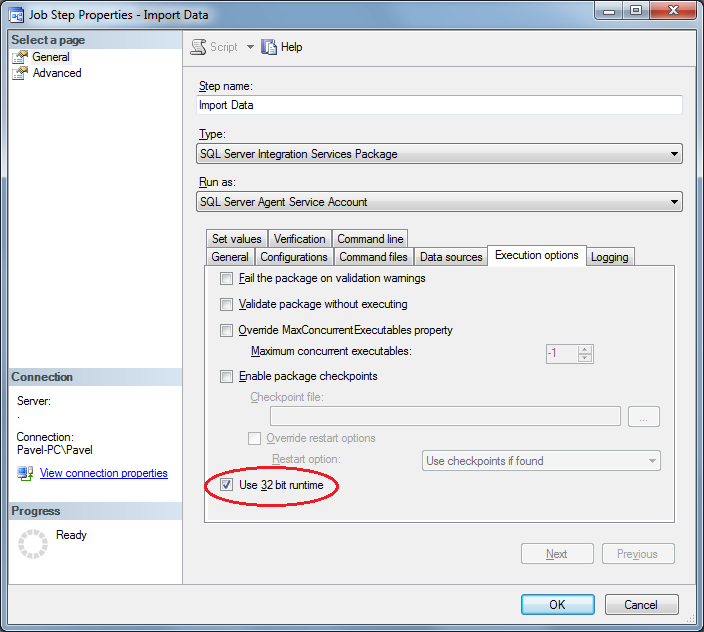
On the SQL Server 2008 and newer the solution is easy as the Job Step Properties dialog for a SQL Server Integration Services Package type has an option to execute the package using the 32 bit runtime. The option can be found on the Execution options tab. Once you set the “Use 32 bit runtime”, the SSIS package will run correctly on the x64 version of SQL Server 2008 and above. The option simply set the /X86 argument of the DTExec utility and you can see it on the Command Line tab, once you check it.

Agent Job Step Properties

SQL Server 2005

Situation is quite different on SQL Server 2005 as the Job Step Properties dialog doesn’t have the option to run the package using the X86 runtime. Although it seems, that we are blocked and it will not be possible to run such SSIS package on the x64 version of SQL Server 2005, there is one workaround you can use to run that package. The workaround is to use Operating System (CmdExec) task and use the x86 version of DTExec utility which is also installed on the x64 instance of SQL Server. It’s located in the SQL Server installation directory under “Program Files (X86)” in DTSBinn directory.

To simplify configuration, first choose the SQL Server Integration Services Package Type and select location a SSIS package you want to run.

New Job Step

Once you have selected the package and configured everything necessary for the package execution, you can switch to the Command Line tab where you can see all the necessary arguments to execute the DTExec utility. If you know all the arguments, you do not need to do this steps and simply configure the CmdExec task, although in this way you do not need to write the arguments manually.

New Job Step Command Line

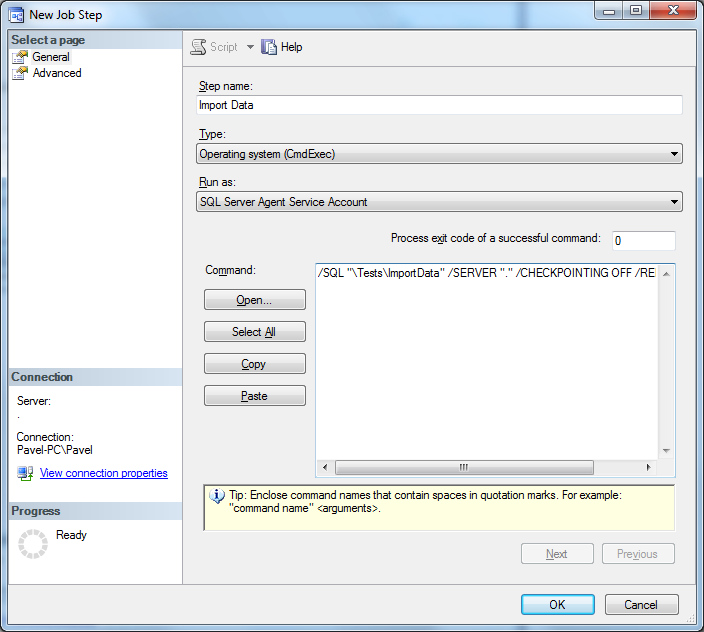
After setting all the necessary parameters, change the step Type to Operating System (CmdExec). All the arguments for the DTExec appear in the command TextBox.

New Job Step - CmdExec

Now you only add the x86 version of DTExec utility including whole path to it.

New Job Step - CmdExec after update

After this, you have a SSIS Package with Excel source/destination (or other data source/destination with only 32bit drivers) configured to run on X64 instance of SQL Server.

Fuzzy strings matching using Levenshtein algorithm on SQL Server (T-SQL vs CLR)

Levenshtein algorithm is one of possible fuzzy strings matching algorithm. Levenshtein algorithm calculates Levenshtein distance which is a metric for measuring a difference between two strings. The Levenshtein distance is also called an edit distance and it defines minimum single character edits (insert/updates/deletes) needed to transform one string to another. Details on the algorithm itself can be found on Wikipedia.
When you need to use it in queries, functions or stored procedures you have two possibilities – T-SQL implementation and CLR implementation.
I will show both solutions here and also compare the speed of both solutions.

T-SQL implementation of Levenshtein algorithm

For T-SQL I will took the one I have found on the SqlTeam.com forums a which was originally developed by Joseph Gama as mentioned in the SqlTeam post.

CREATE FUNCTION [dbo].[edit_distance](
  @s1 nvarchar(3999),
  @s2 nvarchar(3999))
RETURNS int
AS
BEGIN
  DECLARE @s1_len int, @s2_len int
  DECLARE @i int, @j int, @s1_char nchar, @c int, @c_temp int
  DECLARE @cv0 varbinary(8000), @cv1 varbinary(8000)
  SELECT
    @s1_len = LEN(@s1),
    @s2_len = LEN(@s2),
    @cv1 = 0x0000,
    @j = 1, @i = 1, @c = 0

  WHILE @j <= @s2_len
    SELECT @cv1 = @cv1 + CAST(@j AS binary(2)), @j = @j + 1
  WHILE @i <= @s1_len

  BEGIN
    SELECT
      @s1_char = SUBSTRING(@s1, @i, 1),
      @c = @i,
      @cv0 = CAST(@i AS binary(2)),
      @j = 1

    WHILE @j <= @s2_len
    BEGIN
      SET @c = @c + 1
      SET @c_temp = CAST(SUBSTRING(@cv1, @j+@j-1, 2) AS int) +
        CASE WHEN @s1_char = SUBSTRING(@s2, @j, 1) THEN 0 ELSE 1 END
      IF @c > @c_temp SET @c = @c_temp
      SET @c_temp = CAST(SUBSTRING(@cv1, @j+@j+1, 2) AS int)+1
      IF @c > @c_temp SET @c = @c_temp
      SELECT @cv0 = @cv0 + CAST(@c AS binary(2)), @j = @j + 1
    END
    SELECT
      @cv1 = @cv0,
      @i = @i + 1
  END

  RETURN @c
END

CLR implementation of Levenshtein algorithm

public class FuzzyStrings{
  /// <summary>
  /// Calculates the Levenshtein Distance between two strings.
  /// It is minimum of single character insert/delete/update operations needed to transfrom
  /// first string into the second string
  /// </summary>
  /// <param name="firstString">First string to calculate the distance</param>
  /// <param name="secondString">Second string to calculate the distance</param>
  /// <param name="ignoreCase">Specifies whether to ignore case in comparison</param>
  /// <returns>int represending the Levenshtein Distance</returns>
  public static int LevenshteinDistance(SqlString firstString, SqlString secondString, SqlBoolean ignoreCase)
  {
    string strF = ignoreCase ? firstString.Value.ToLower() : firstString.Value;
    string strS = ignoreCase ? secondString.Value.ToLower() : secondString.Value;
    int lenF = strF.Length;
    int lenS = strS.Length;
    int[,] d = new int[lenF + 1, lenS + 1];

    for (int i = 0; i <= lenF; i++)
      d[i, 0] = i;
    for (int j = 0; j <= lenS; j++)
      d[0, j] = j;

    for (int j = 1; j <= lenS; j++)
    {
      for (int i = 1; i <= lenF; i++)
      {
        if (strF[i - 1] == strS[j - 1])
          d[i, j] = d[i - 1, j - 1];
        else
          d[i, j] = Math.Min(Math.Min(
            d[i - 1, j] + 1,        // a deletion
            d[i, j - 1] + 1),       //an Insertion
            d[i - 1, j - 1] + 1);   // a substitution
      }
    }

    return d[lenF, lenS];
  }
}

You need to compile the code using e.g. C# Express into a an assembly and create the assembly in DB. In my Case the assembly is named [SQLCLR].

CREATE FUNCTION [dbo].[fn_LevenshteinDistance](
  @firstString [nvarchar](4000),
  @secondString [nvarchar](4000),
  @ingoreCase [bit] = 1
)
RETURNS [int]
WITH EXECUTE AS CALLER
AS EXTERNAL NAME [CLRSQL].[FuzzyStrings].[LevenshteinDistance]
GO

Testing of the functions

Once we have properly created both functions we can start testing it. Here is a script for test of both functions on several strings.

SELECT
  dbo.edit_distance('Sunday', 'Monday') AS TSQLDistance,
  ClrSafe.fn_LevenshteinDistance('Sunday', 'Monday', 1) AS CLRDistance

UNION ALL 

SELECT
  dbo.edit_distance('Sunday', 'Sunday') AS TSQLDistance,
  ClrSafe.fn_LevenshteinDistance('Sunday', 'Sunday', 0) AS CLRDistance

UNION ALL

SELECT
  dbo.edit_distance('Sunday', 'sunday') AS TSQLDistance,
  ClrSafe.fn_LevenshteinDistance('Sunday', 'sunday', 0) AS CLRDistance

UNION ALL

SELECT
  dbo.edit_distance('Saturday', 'Monday') AS TSQLDistance,
  ClrSafe.fn_LevenshteinDistance('Saturday', 'Monday', 1) AS CLRDistance

UNION ALL

SELECT
  dbo.edit_distance('This is a first string to Compare', 'This is a second string to Compare') AS TSQLDistance,
  ClrSafe.fn_LevenshteinDistance('This is a first string to Compare', 'This is a second string to Compare', 1) AS CLRDistance

And here are the results of the tests:

TSQLDistance CLRDistance
------------ -----------
2            2
0            0
0            1
5            5
6            6

As we can see, the functions return the same results except the second select. As we have selected not to ignore the case in the CLR version. For T-SQL strings are identical as the function uses a default collation which I have Case Insensitive. If I had a default collation Case Sensitive, then the results will be the same. It could be also possible to modify the T-SQL function to accept parameter for Case Sensitive/Insensitive comparison and then use different collations for that, but it’s not what we want to do here.

Speed comparison

As we saw in previous paragraphs here, both T-SQL and CLR version of the algorithm woks correctly. Now take a look on the calculation speed of the Levenshtein distance by both version.

For the test we can use a simple script, which will calculate the Levenshtein distance in cycle 10 000 times

DECLARE
   @TSQLStartTime datetime,
  @TSQLEndTime datetime,
  @CLRStartTime datetime,
  @CLREndTime datetime,
  @distance int,
  @i int

SELECT
  @i = 0,
  @TSQLStartTime = GETDATE();

WHILE (@i < 10000)
BEGIN
  SELECT
    @distance = dbo.edit_distance('This is a first string to Compare', 'This is a second string to compare'),
    @i = @i + 1
END

SELECT
  @TSQLEndTime = GETDATE(),
  @i = 0,
  @CLRStartTime = GETDATE()

WHILE (@i < 10000)
BEGIN
  SELECT
    @distance = [ClrSafe].fn_LevenshteinDistance('This is a first string to Compare', 'This is a second string to compare', 1),
    @i = @i + 1
END

SELECT @CLREndTime = GETDATE()

SELECT
  DATEDIFF(millisecond, @TSQLStartTime, @TSQLEndTime) AS TSQLDuration,
  DATEDIFF(millisecond, @CLRStartTime, @CLREndTime) AS CLRDuration

Here are the results

TSQLDuration CLRDuration
------------ -----------
22993        763

As we can see the 10 000 times calculation using the T-SQL version took 22993 milliseconds which is in average circa 2.3 millisecond for calculating the distance for the strings in our test query.

On the other side the 10 000 times calculation using CLR took only 763 milliseconds which is in average circa 0.08 milliseconds for calculating the distance for the same strings as in T-SQL version.

Conclusion

From the results we can see that the CLR is about 30 times faster on the same machine than the T-SQL version of the same algorithm. Even the T-SQL version took only 2.3 milliseconds per calculation of sample texts and it’s quite good to use in normal usage, the use or CLR can enormously decrease the processing time when processing higher volume of records.

Also it is another example where CLR beats the T-SQL solution and where it has sense to use the CLR instead of pure T-SQL.

Keyboard shortcuts manager in SSMS Denali

Another new feature of the new SSMS Denali is introduction of the new Keyboard Shortcuts Manager known from the Visual Studio, as the new version of SSMS is based on the VS 2010 shell and is more bound to the VS shell than any previous version.

If you get used for shortcuts in some 3rd party SQL Server management application, now you can configure the SSMS to use your own shortcuts.

SSMS Denali Options Dialog - Keyboard Shortcuts

For example if you are missing a default shortcut Ctrl+Shift+M for “Specify Values for Template Parameters” from previous version of SSMS and which was not set-up after my installation of SSMS Denali, you can use the shortcuts manager and assign it.

What I have found missing compared to previous version of SSMS are the custom query shortcuts. Here is screenshot from SSMS 2008R2

SSMS 2008R2 Options Dialog - Keyboard Shortcuts

But When you take a look on the keyboard shortcuts in the SSMS Denali, you will find shortcuts for the Custom Queries, although I didn’t find a way how to define the custom queries. So hope, that Microsoft will add a GUI into the options dialog for defining such queries in upcoming releases of the Denali. On the first screenshot here you can see, that there are also separate commands and shortcuts for the sp_help, sp_who and sp_lock procedures.

SSMS Denali Options Dialog - Keyboard Shortcuts - Custom Queries

Code Snippets in SSMS Denali

Microsoft has introduced a new version of SQL Server Management Studio in the first CTP1 preview of the next SQL Server version code name Denali. The new SSMS is based on new VS 2010 shell and brings some new features.

One of the new features introduced in the CTP1 are new code snippets. Who was working with third party tools or was developing applications in Visual Studio, for sure knows this feature well.

The SSMS supports two kinds of snippets

  1. Insert snippets (Expansion)
  2. Surround With snippets

You can manage the snippets using the Code Snippets Manager available from Tools menu.

SSMS Denali - Code Snippets Manager

The code snippets are using the standard VS2005 snippet XML format, so you can use current available tools for creating and modifying the SQL Server snippets.

<?xml version="1.0" encoding="utf-8" ?>
<CodeSnippets  xmlns="http://schemas.microsoft.com/VisualStudio/2005/CodeSnippet">
<_locDefinition xmlns="urn:locstudio">
    <_locDefault _loc="locNone" />
    <_locTag _loc="locData">Title</_locTag>
    <_locTag _loc="locData">Description</_locTag>
    <_locTag _loc="locData">Author</_locTag>
    <_locTag _loc="locData">ToolTip</_locTag>
</_locDefinition>
    <CodeSnippet Format="1.0.0">
        <Header>
            <Title>Create Inline Table Function</Title>
            <Shortcut></Shortcut>
            <Description>Creates an inline table function.</Description>
            <Author>Microsoft Corporation</Author>
            <SnippetTypes>
                <SnippetType>Expansion</SnippetType>
            </SnippetTypes>
        </Header>
        <Snippet>
            <Declarations>
                                <Literal>
                                    <ID>SchemaName</ID>
                                    <ToolTip>Name of the schema</ToolTip>
                                    <Default>dbo</Default>
                                </Literal>
                                <Literal>
                                    <ID>FunctionName</ID>
                                    <ToolTip>Name of the function</ToolTip>
                                    <Default>FunctionName</Default>
                                </Literal>
                                <Literal>
                                    <ID>Param1</ID>
                                    <ToolTip>Name of the input parameter</ToolTip>
                                    <Default>param1</Default>
                                </Literal>
                                <Literal>
                                    <ID>Datatype_Param1</ID>
                                    <ToolTip>Data type of the input parameter</ToolTip>
                                    <Default>int</Default>
                                </Literal>
                                <Literal>
                                    <ID>Param2</ID>
                                    <ToolTip>Name of the input parameter</ToolTip>
                                    <Default>param2</Default>
                                </Literal>
                                <Literal>
                                    <ID>Datatype_Param2</ID>
                                    <ToolTip>Data type of the input parameter</ToolTip>
                                    <Default>char(5)</Default>
                                </Literal>
            </Declarations>
            <Code Language="SQL">
<![CDATA[CREATE FUNCTION [$SchemaName$].[$FunctionName$](
    @$Param1$ $Datatype_Param1$,
    @$Param2$ $Datatype_Param2$)
RETURNS TABLE AS RETURN(
    SELECT @$Param1$ AS c1,
           @$Param2$ AS c2)]]>
            </Code>
        </Snippet>
    </CodeSnippet>
</CodeSnippets>

Insert (Expansion) snippets

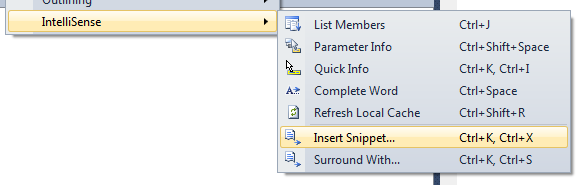
The expansion snippets are similar to the Templates known from previous versions of SSMS and which are also available in new version of SSMS. You can insert the snippet using the menu Edit/ItelliSense/Insert Snippet…, using a default keyboard shortcut Ctrl+K, Ctrl+X, or using the context menu after mouse right click.

SSMS Denali IntelliSense - Isert Snippet

Once you invoke the command you can choose from the available snippets.

SSMS Denali IntelliSense - choosing snippet

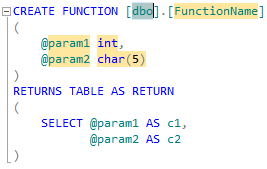
The snippet behave differently from the Templates. After the snippet is inserted several replacement parts are highlighted and you can substitute the default values by your own. Then all all occurrences are automatically substituted in the snippet. You can switch among the replacements using the Tab key. Once you are ready with modifications you simply hit the Enter Key.

SSMS Denali - Create Function Snippet

Surround With snippets

In contrast to Insert (Expansion) snippets the Surround with snippets take all the selected text and surround it by the code contained in the snippet. Surround with snippets are again accessible using the menu or Ctrl+K, Ctrl+S default shortcut.

SSMS Denali - Inserting Surround With Snippet

SSMS Denali - Surround With Snippet

Missing snippet functionality

The current snippet implementation in SSMS has only a few possibilities and small power comparing the to snippets in Visual Studio. Hope that it is only by the current CTP status and Microsoft will implement following before the final release of the product.

Snippets shortcuts

As you can see from the image of the Code Snippet Manager above, there is Shortcut written I the details of the snippet. Unfortunately all the snippets have unassigned shortcuts and event you edit the source of the snippet and put some shortcuts, the current version of SSMS doesn’t support the snippet shortcuts. It could be nice to have eg. “itf” shortcut for Inline Table Function and simple press Tab for the snippet to be inserted as it works in Visual Studio

Functions in Snippets

I would welcome a functions element functionality in the SQL snippets. E.g.. Function for expanding table fields from a table name etc. Something like GenerateSwitchCases function for expanding enum members in C#. By adding such functionality it would be very easy to write a easy to use complex snippets e.g.. for CRUD procedures generation etc.. SSMS Denali is Based on VS 2010 and visual studio doesn’t allow writing custom functions for use inside of snippets, at least Microsoft could introduce at least the function for table expansions I mentioned here.

SSRS 2008 & Multi-Line email body in Data-Driven Subscription delivered by email

Introduction

When you create a report in SSRS 2008 and then want to create a Data Driven Subscription to this report and want to deliver it by email you can come to a problems with the message in the email body.

Let’s say we have a test report and create Data Driven Subscription to this report. The query in the subscription will return fields SubscriberEmail and EmailBody. In the SubscriberEmail we will have email address to which the report should be delivered and in the EmailBody we will have a message we want to send in the email (e.g..explanation of the report, how to use it etc.)

SELECT
    'somebody@domain.com' AS SubscriberEmail,
    N'First Article of Email Body.
Second Article of Email Body.
Third Article of Email Body.' AS EmailBody

The setting could be like below (Comment is email body). Also notice the edit box for the Comment static value.. It’s a small single line TextBox.

SSRS Data Driven Subscription Step 4

SSRS Data Driven Subscription - Email Body

A problem occurs when  you want the email body to contain several articles separated by new lines. All the new lines in the delivered email will be removed and all the articles will be delivered as a single article.

First Article of Email Body.  Second Article of Email Body.  Third Article of Email Body.

In contrast, when you are creating a normal subscription  the Comment text box is multi line and you will receive a correct multi line email.

SSRS Standard Email Subscription

There is no way to send a simple text as multi line email with several articles.

Solution

As I mentioned above, you are not able to send a simple test as multi line email with several articles. Although, there is workaround and if the email client is accepting HTML, you can put as the email body a simple HTML source code. Then the email body will be correctly rendered in the email client as multi line text.

SELECT
    'somebody@domain.com' AS SubscriberEmail,
    N'
<html>
  <head>
    <meta content="text/html; charset=ISO-8859-1" http-equiv="content-type">
  </head>
  <body>
    <p>First Article of Email Body.</p>
    <p>Second Article of Email Body.<p>
    <p>Third Article of Email Body.<p>
  </body>
</html>' AS EmailBody

As I was searching over the Internet I found, that people have the same problem also with SSRS 2005. The issue is solved in SSRS 2008 R2 and in the R2 it works correctly even without the HTML.

Denali side by side installation with SQL 2008 or SQL 2008 R2 corrupts BIDS

Today I’ve just installed a SQL Server Code Name Denali CTP1 as a named instance side by side with instance of SQL Server 2008 R2 to take a look on the new features of Denali

Everything worked fine, unless I started a BIDS and wanted to create a new SSIS project (or open existing one).

Once you try it, you will se a below message.

Corrupted Installation of BIDS cannot open project

The problem is that the CTP1 version of Denali still uses VS2008 shell as Business Intelligence Development studio. In future versions it will be replaced by the VS2010 shell. But now it uses the V2008 shell as SQL Server 2008 or 2008R2 and the Side by Side installation corrupts BIDS.

To correct this, you have to uninstall Denali, and reinstall SQL2008. Then you can install Denali without BIDS.

So to save you trouble, and you want to install Denali side by side with existing SQL 2008 or SQL 2008 R2 installation, you can install all the features of Denali, except the BIDS.